With ASP.NET Core 3.0, the ability to inject an ILogger or ILoggerFactory into the Startup class has been removed, so we can no longer do this:
This file contains hidden or bidirectional Unicode text that may be interpreted or compiled differently than what appears below. To review, open the file in an editor that reveals hidden Unicode characters.
Learn more about bidirectional Unicode characters
I understand why this has been done, because creating a temporary DI container just for the startup process adds a lot of complexity and potential for errors.
However, my ConfigureServices method (and the new ConfigureContainer method added in 3.0) does quite a bit of work, including loading extension assemblies; I want to be able to log during that time.
I also want to make sure I only pass around the ILogger from the Microsoft.Extensions.Logging namespace to other objects used at startup.
The Workaround
I use NLog for my logging (https://nlog-project.org/). In my Program’s Main method I configure it like so:
This file contains hidden or bidirectional Unicode text that may be interpreted or compiled differently than what appears below. To review, open the file in an editor that reveals hidden Unicode characters.
Learn more about bidirectional Unicode characters
You can grab details on how to create an nlog.config file from the NLog docs, I won’t go into it here.
Then, in my Startup class, I can create the NLogLoggerProvider class (this is sort of a factory for creating the Microsoft ILogger instances), and from that I can get my logger instance:
This file contains hidden or bidirectional Unicode text that may be interpreted or compiled differently than what appears below. To review, open the file in an editor that reveals hidden Unicode characters.
Learn more about bidirectional Unicode characters
I’m currently investigating how we port a large ASP.NET application to ASP.NET Core, and one of the things I had to figure out this morning was how to include information about the logged-in user in our logs.
The most important value to collect is the username, but I also need to be able to collect other information from the session at some point.
In the original ASP.NET app we did some slightly questionable HttpContext.Current access inside the logging providers, which I didn’t love.
In ASP.NET Core however, I can combine the use of the middleware system with NLog to add this information to my logs in a much better/easier way.
I then updated the default HomeController to write a log message in the index page:
This file contains hidden or bidirectional Unicode text that may be interpreted or compiled differently than what appears below. To review, open the file in an editor that reveals hidden Unicode characters.
Learn more about bidirectional Unicode characters
This file contains hidden or bidirectional Unicode text that may be interpreted or compiled differently than what appears below. To review, open the file in an editor that reveals hidden Unicode characters.
Learn more about bidirectional Unicode characters
Now we can do the middleware changes (this is the important bit). In the Startup class’ Configure method, we have an additional Use method:
This file contains hidden or bidirectional Unicode text that may be interpreted or compiled differently than what appears below. To review, open the file in an editor that reveals hidden Unicode characters.
Learn more about bidirectional Unicode characters
The MappedDiagnosticsLogicalContext class is an NLog class that lets you provide values that are scoped to the current async context. These values are attached to every log event raised inside the using block. The call to next() inside our using means that the entirety of the middleware pipeline (from that point onwards) has the userName property attached to it.
Displaying the Username in the Log
The last part of this is to update our nlog.config to display the username.
To do this, we use the MDLC Layout Renderer to pull the userName property out of the log event, by adding ${mdlc:userName} inside our layout:
This file contains hidden or bidirectional Unicode text that may be interpreted or compiled differently than what appears below. To review, open the file in an editor that reveals hidden Unicode characters.
Learn more about bidirectional Unicode characters
Now, if we start the application, and log in, we get our username in each log event!
This file contains hidden or bidirectional Unicode text that may be interpreted or compiled differently than what appears below. To review, open the file in an editor that reveals hidden Unicode characters.
Learn more about bidirectional Unicode characters
The real bonus of assigning the username inside the middleware though is that the extra detail gets added to the internal Microsoft.* logs as well:
This file contains hidden or bidirectional Unicode text that may be interpreted or compiled differently than what appears below. To review, open the file in an editor that reveals hidden Unicode characters.
Learn more about bidirectional Unicode characters
2019-09-07 10:41:05.0707 | INFO | ajevans | Main.Controllers.HomeController | Home page
2019-09-07 10:41:05.0779 | INFO | ajevans | Microsoft.AspNetCore.Mvc.Internal.ControllerActionInvoker | Executed action method Main.Controllers.HomeController.Index (Main), returned result Microsoft.AspNetCore.Mvc.ViewResult in 5.3381ms.
You’ll notice that not all the log messages have a username value. Why is that?
The reason is that those log messages come from middleware that occurs earlier in the pipeline than our middleware that assigns the username, so those log events won’t contain that property.
In conclusion…
So, you’ve seen here how to use the NLog MappedDiagnosticsLogicalContext class and ASP.NET Core middleware to add extra information to all the log messages for each request. Don’t forget that you can add as much information to the log as you need, for example you could pull some user session state value out of the Session and add that too.
I’m going to spend a few minutes here discussing some advice for designing/maintaining large enterprise-grade .NET applications, particularly ones that you sell to others, rather than in-house creations.
Disclaimer: I work largely with big applications used by enterprise customers. I imagine a lot of people reading this do as well, but plenty of people may disagree with some of my thoughts/suggestions. What follows is just based on my experience of designing and deploying user-driven ASP.NET applications.
A Brief Defense of (Deployment) Monoliths
Microservices are all the rage right now, and they are very cool, I will not deny that; small blocks of easy-to-maintain logic that all build, deploy and start quickly are brilliant. They’re great when you are deploying your own software, either onto your own premises or in the cloud; but what if your software has to be deployed onto someone else’s environment, by the owner of that environment?
What if they don’t use containers, or even use virtualisation? What if they have no DevOps pipeline at all, and everything must be done manually? What if those global customers have disparate regulatory and internal governance concerns that govern how and where data is stored, and how your application is managed?
In these situations, deployment simplicity is one of the most important considerations we have, and microservices deployment is by no means simple.
What I need is to keep the number of deployable components to a minimum. My goal is a one-click installer, followed by minimal configuration.
I asked a panel at a recent Microsoft Azure conference what solutions/plans they had for taking a complex microservices architecture and deploying it in someone else’s infrastructure as a simple-to-install component. If they use Azure as well, then you might be in luck in the near future, but other than that I didn’t get any answers that gave me hope for distributable microservice packages.
Managing Monoliths
In the modern development ecosystem, some people think ‘monolith’ is a dirty word. They’re seen as inevitable blobs of spaghetti code, horrible bloat and painful development experiences. But that doesn’t have to be true.
I’m going to write up a couple of blog posts that go into specific tips for maintaining enterprise ASP.NET monoliths, but I’ll start with some general advice.
All of the following applies to ASP.NET applications on the full .NET Framework, and .NET Core (soon to be known as .NET 5).
Make it Modular, Make it Patchable
The concept of a ‘Modular Monolith’ is not new. If you don’t break your application into multiple libraries (i.e. DLLs), you’re going to get into the world of spaghetti code so fast it will make your source control repository collapse in on itself.
I find that circular reference prevention actually ends up helping to enforce good design patterns, which you do not get if everything is in one big project.
Even if all your code is super tidy, if you’re distributing your software to enterprise customers, at some point you are going to need to patch something, because big customers just don’t upgrade to your latest version very often (once a decade is not that unusual). They certainly aren’t going to just upgrade to the latest build on trunk/master when they find a bug that needs fixing.
If you need to reissue the entire application to patch something, your customer’s internal test teams are going to cry foul, because they can’t predict the impact of your changes, so they’ll say they need to retest the whole thing. They definitely won’t go on trust when you say that all your automated tests pass.
So, to that end, do not build an ASP.NET (v4 or Core) web application that sits in one project (despite what most intro tutorials start off telling you to do). I don’t care what size it is, break it up.
You can add your own Assembly Loading startup process if you need to. The .NET loaders do a great job of loading your references for you, but I find you end up needing a bit more control than you get from the default behaviour. For example, you can explicitly load the libraries of your application based on some manifest file (helpful to control patched DLL versions).
Micro-kernels are your friend
If you can, then build your application using a micro-kernel architecture. By micro-kernel, I mean that there should be a central core of your application that provides base technical support features (data access, logging, dependency injection, etc) but adds no actual functionality to your application.
Once you’ve got that, you can:
Update (and patch) blocks of functionality in your application easily. These change much more often than your core.
Create customer-specific features (which happens all the time) without polluting your general application code.
Develop and test your functionality blocks in isolation.
Scale-out your development to multiple teams by giving them different blocks of functionality to work on.
Does that sound familiar? A lot of those advantages are shared with developing microservices; small blocks of functionality with a specific problem domain, that can be developed in isolation.
In terms of deployment we’ve still got one deployment package; it’s your CI system that should bring the Core and Functionality components together into one installer or other package, based on a list of required components for a given customer or branch.
I will say that defining a micro-kernel architecture is very hard to do properly, especially if you have to add it later on, to an existing application architecture.
Pro tip – define your own internal NuGet packages for your Core components, so they can be distributed easily; you can then easily ‘release’ new Core versions to other teams.
If you output NuGet packages from your CI system, you can even have some teams that need Core functionality in development working off an ‘alpha’ build of Core.
Enforce Layer Separation in your APIs (or ‘if you use a data context in an MVC controller the compiler will slap you’)
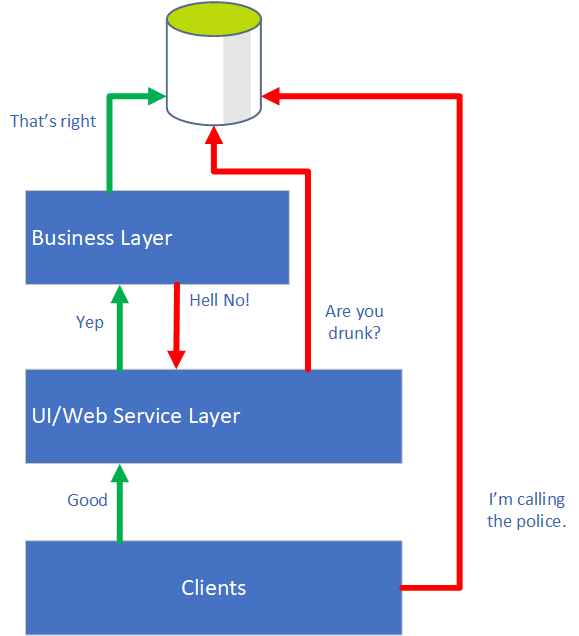
Just because everything may be running in one process doesn’t mean you shouldn’t maintain strict separation of layers.
At a minimum, you should define a Business layer that is allowed to access your database, and a UI/Web Service layer, that is not.
The business layer should never consume a UI service, and the UI layer should never directly access/modify data.
Clients of your application should only ever see that UI or Web Service layer.
Escalating terrors in software design.
You could enforce all of this through code reviews, but I find things can still slip through the gaps, so I like to make my API layout do the work in my Core to enforce the layout.
I find a good way to do this in a big .NET application (micro-kernel or otherwise) is to:
Define clear base classes that support functionality in each layer. For example, create a MyAppBusiness class in your business layer, that all business services must derive from. Similarly, define a MyAppController class that all MVC controllers will derive from (which in turn derives from the normal Controller class).
In those classes, expose protected methods to access core services that each layer needs. So your base MyAppBusiness class can expose data access to derived classes, and your MyAppController class can provide localisation/view-rendering support.
In your start-up procedure (preferably when you register your Dependency Injection services, if you use it, which you should), only register valid services, that derive from the right base class. Enforce by namespace/assembly if necessary. Throw exceptions if someone has got it wrong.
Where possible, developer mistakes should be detectable/preventable in code. Bake it into your APIs and you can make people follow standards because they can’t do anything if they don’t.
Next Up
In future posts on these sort of topics, I’ll talk about:
Tips for working with Entity Framework in applications with a complex database
Automated testing of big applications
Using PostSharp to verify developer patterns at compile time


 Alistair Evans